This is awkward!
This site only supports desktop size screens.
Changelog
New features, improvements and fixes to Lyrics Tags Generator.
Niche Additional Genres
By Nicholas
Four more genres have been added, this time from the more niche side of things: angelcore, house, wave and hardtekk. They work the same way as the existing genres, picking one adds a few genre tags to the generated set.
What's new
- Angelcore, house, wave and hardtekk are now options in the genre dropdown.
- The API accepts them too, via the
genreparameter. - They're listed on the genre page and in the documentation.
- Angelcore adds
angelcore,angelcore 2026,angelcore musicandangelic music. - House adds
house,house 2026,house musicanddeep house. - Wave adds
wave,wave 2026,wave musicandhard wave. - Hardtekk adds
hardtekk,hardtekk 2026,hardtekk musicandtekk. - The year tag always follows the current year, the same as the other genres.
Fixes
- The API accepted genres in any casing, like
genre=Rock, but quietly left out the genre tags unless the genre was all lowercase. Every casing gets the genre tags now. The site always sent lowercase, so this only affected direct API requests.
Site Redesign
By Nicholas
The whole site got a fresh coat of paint. The layout, colors and font are the same as before, it just looks a lot cleaner now, and most pages picked up a few small things that make them nicer to use along the way. Nothing changes in how tags are generated, this one's purely about how the site looks and feels.
What's new
- A new footer with links to every page, including the format and genre pages which weren't linked from anywhere before, plus GitHub, X and email.
- The genre page now shows the exact tags each genre adds to the generated set.
- Each format page shows its templates as cards, with the tags split out, the
{variables}highlighted, a copy button, and a switcher to jump between formats. - The changelog is now a timeline, and each entry links to the one before and after it.
- The documentation has a quick start snippet, shortcut cards to the main sections and a grouped sidebar.
- The FAQ has a "Still have questions?" box at the bottom to send feedback or email me.
- A proper 404 page instead of the default one.
What's changed
- The generator form sits in a card now, with smaller step numbers, a "Required" badge on the song field and the character count next to each hint.
- Generated tags sit in one card with a bar showing how much of the 500 character budget is used. Hovering a tag turns it red, since clicking it deletes it.
- Suggested titles, SEO keywords and hashtags each get their own card, with the copy buttons up top.
- Every button on the site is the same size now, either black or white with a border.
- The nav is lighter, highlights the page you're on, and dropped the little link icons next to every item.
- The FAQ, privacy policy and the other pages share the same header as the documentation, and the FAQ questions sit in a single card with an icon next to each one.
- Text across the site is a size bigger so it's easier to read.
- The feedback form checks your email as you go, shows errors inside the form instead of a toast, and you can send with ⌘/Ctrl + Enter.
- Toasts have a new look with colored icons and a close button, and they show up in the bottom right so they don't cover the nav.
- The home page title is now "Lyrics Tags Generator - Free YouTube Metadata Generator".
Improvements
- Switching between light and dark mode fades smoothly instead of snapping.
- Code blocks in the documentation follow the theme instead of always being dark, and they have syntax highlighting now.
- The parameter tables in the documentation are a lot more compact. The format and genre rows list their values side by side instead of one per line.
- Links are a slightly darker green so they're easier to read on a white background.
- The notes in the documentation had green text on a green background, the text is now regular gray so it's easier to read.
- The development tools box remembers its settings between visits, and has a note that ⌘ + D shows or hides it. The green banner at the top in development mode is gone.
Fixes
- The custom string template section in the documentation said
{b}is for the title, it's actually{t}. - The privacy policy was missing a space before "Effective Date".
Remove low ranking tags
By Nicholas
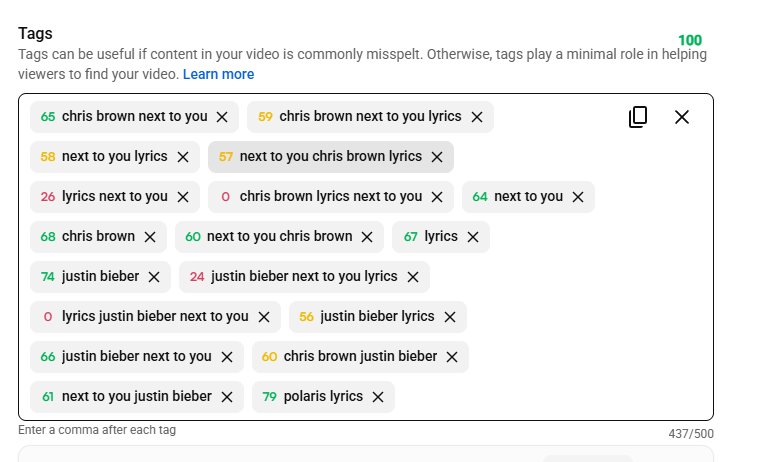
A handful of the generated tags were coming back as low ranking on vidIQ, so they're no longer generated. They all shared the same shape, the format word wedged between the artist and the title, so you'd get something like "drake lyrics god's plan". Dropping them also frees up part of the 500 character budget for tags that actually rank.
What's changed
- The lyrics format no longer generates
{artist} lyrics {title}orlyrics {firstFeature} {title}. - Letra and testo had the same shape in both directions, so
{artist} letra {title},{title} letra {artist}andletra {title} {artist}are gone, along with the three testo equivalents. - Bass boosted drops
{title} bass boosted {artist}, and nightcore/sped up drops{title} sped up {artist}. - Slowed & reverb, phonk and none are untouched. They already kept the format word at the end.
- Shorter tags like
lyrics {title}andtesto {artist}stay, since those still rank fine. - The tag templates listed in the documentation have been updated to match.
Context Tags on Gemini
By Nicholas
The context tags feature, the one you get by adding \context to the artist field, now runs on Google's Gemini instead of Groq. Nothing changes in how you use it, it's the same flag and the same handful of tags about why a song is going around on TikTok or Reels. The model behind it is just a newer one, so the tags it comes back with should be a little sharper.
What's changed
- Context tags are generated by Gemini 3.6 Flash instead of Llama 3.3 70B on Groq.
- The
\contextflag on the site, and thecontextoption in the Discord bot and the API, work exactly as before. - If Gemini is unreachable or rate limited, the request still goes through and you just get your tags without the context ones, same as it did with Groq.
- Running your own copy of the site now needs a
GEMINI_API_KEYin place ofGROQ_API_KEY.
New Genres Addition
By Nicholas
Six new genres have been added: alternative, emo, rock, EDM, trap and electronic. Picking one adds a few genre tags to the generated set, the same way the existing genres do.
What's new
- Alternative, emo, rock, EDM, trap and electronic are now options in the genre dropdown.
- The API accepts them too, via the
genreparameter. - They're listed on the genre page and in the documentation.
Primary Accent Color
By Nicholas
The accent color across the site is now green (#30D158) instead of blue, so all my services share the same theme color. A few small things got fixed along the way.
What's changed
- Links, badges, callouts and other accents are now green instead of blue.
- The documentation page uses it too, in the "On this page" highlight, the API Reference badge and the heading anchors.
- Sharing the site on Discord, Twitter/X or elsewhere now produces a slightly nicer card, with proper image alt text and corrected Twitter tags.
Fixes
- The toggles were nearly invisible in dark mode and had a gray knob when switched on. They now have a visible track and a white knob in both themes.
- The FAQ answers were a size bigger than the rest of the site's text, they now match the site's default text size.
- Removed the two demo videos from the documentation page.
Dark Mode Support
By Nicholas
The site finally has dark mode. It follows your system theme by default, and if you'd rather pick one yourself there's a sun/moon button in the nav. Whatever you choose is saved in your browser, so it sticks around next time you visit.
What's new
- Dark mode on every page, from the generator to the documentation and everything in between.
- A theme toggle in the nav. Nothing fancy, it just flips the theme and remembers your choice.
- Toasts, popups, dropdowns and inputs switch along with the rest of the site.
Improvements
- The drop shadow under the nav when you scroll was basically invisible in dark mode, so it now gets a stronger shadow and a thin border there.
- Cleaned up a bunch of text colors that were slightly off from each other, so everything reads the same in both themes.
Introducing Changelog
By Nicholas
The site now has a changelog. It's nothing major, just a place where short notes get posted whenever something is added, changed or fixed, so if you're ever curious about what's been going on with the site you can have a quick look here instead of digging through commits on GitHub.
What's new
- A changelog page where all updates are posted.
- Each post is its own markdown file in the
changelogs/folder of the repo. - A
CHANGELOG.mdin the root of the repo with a summary of everything.